
This report can show you how quickly tickets are created during the day. This report is useful for identifying peak hours and determining whether your team is adequately staffed.

Creating your report
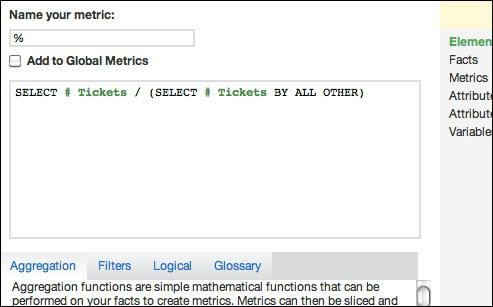
To create this report, you only need one metric. This metric must be created in the Advanced Metric Editor. For more information on the Advanced Metric Editor or creating custom metrics see, the How to create custom metric video on GoodData's support site.
The metric can be defined as:
- SELECT # Tickets computes the number of tickets. This metric is sliced by attributes, and can be selected through the pick-list Metrics folder.
- (SELECT # Tickets BY ALL OTHER) divides the number of tickets in each attribute
by all eligible tickets. The BY ALL OTHER clause locks the aggregation to include all
# Tickets.
This report uses the Day of Week and Created at Hour attributes. These attributes distribute tickets by the day of the week and hour created.
Generating the heatmap
Once you create your report, you can now set the primary color of your heatmap. This report uses colors to compare values to other values, instead of the actual result. To generate these colors, use custom formatting codes in the Custom Formatting module. Underneath the formatting image are blue, green, and red format codes. You can copy-and-paste these codes directly.

- Blue: [>=.011][backgroundcolor=0A1F33][color=0A1F33]#%; [>=.01][backgroundcolor=143D66][color=143D66]#%; [>=.009][backgroundcolor=1F5C99][color=1F5C99]#%; [>=.008][backgroundcolor=297ACC][color=297ACC]#%; [>=.007][backgroundcolor=3399FF][color=3399FF]#%; [>=.006][backgroundcolor=5CADFF][color=5CADFF]#%; [>=.005][backgroundcolor=85C2FF][color=85C2FF]#%; [>=.004][backgroundcolor=ADD6FF][color=ADD6FF]#%; [>=.003][backgroundcolor=D6EBFF][color=D6EBFF]#%; [>=.002][backgroundcolor=EBF5FF][color=EBF5FF]#%; [<.002][backgroundcolor=ffffff][white]0; [=Null][backgroundcolor=ffffff][white]0
- Red: [>=.011][backgroundcolor=660011][color=660011]#%; [>=.01][backgroundcolor=99001A][color=99001A]#%; [>=.009][backgroundcolor=CC0022][color=CC0022]#%; [>=.008][backgroundcolor=FF002B][color=FF002B]#%; [>=.007][backgroundcolor=FF3355][color=FF3355]#%; [>=.006][backgroundcolor=FF667F][color=FF667F]#%; [>=.005][backgroundcolor=FF99AA][color=FF99AA]#%; [>=.004][backgroundcolor=FFCCD5][color=FFCCD5]#%; [>=.003][backgroundcolor=F7D4DA][color=F7D4DA]#%; [>=.002][backgroundcolor=F0DBDF][color=F0DBDF]#%; [<.002][backgroundcolor=ffffff][white]0; [=Null][backgroundcolor=ffffff][white]0
- Green: [>=.011][backgroundcolor=226600][color=226600]#%; [>=.01][backgroundcolor=339900][color=339900]#%; [>=.009][backgroundcolor=44CC00][color=44CC00]#%; [>=.008][backgroundcolor=55FF00][color=55FF00]#%; [>=.007][backgroundcolor=77FF33][color=77FF33]#%; [>=.006][backgroundcolor=99FF66][color=99FF66]#%; [>=.005][backgroundcolor=BBFF99][color=BBFF99]#%; [>=.004][backgroundcolor=DDFFCC][color=DDFFCC]#%; [>=.003][backgroundcolor=DFFAD1][color=DFFAD1]#%; [>=.002][backgroundcolor=E3EDDE][color=E3EDDE]#%; [<.002][backgroundcolor=ffffff][white]0; [=Null][backgroundcolor=ffffff][white]0
Comments
0 comments
Please sign in to leave a comment.