
by Bryan Castro, GoodData
When performing date arithmetic, it's necessary to use what we call Date Attributes . Date attributes are special because they can be used as a text field, as well as a numeric field where we can perform aggregations. Date attributes are integer representations of the dates, which enable us to do math operations on them.
For example, with the use of activity and registration date attributes, you can learn how many days have elapsed between a user's most recent activity and their registration date.
-
SELECT AVG(SELECT Activity Date - Registration Date BY Records of Registration )
Creating your report
This recipe uses date facts to measure the amount of time since tickets were updated.
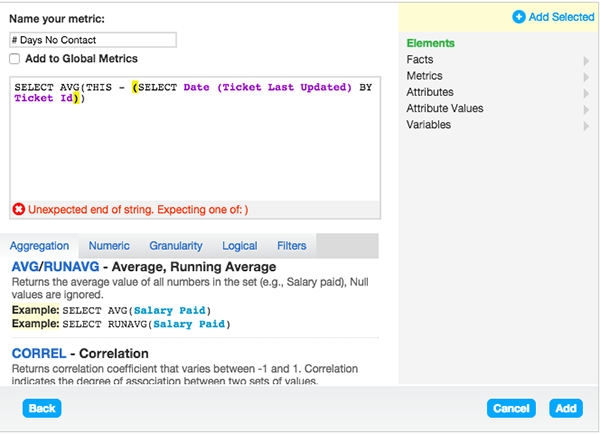
- Name your metric # Days No Contact
- Type in SELECT AVG( THIS
- From the pick-list Attributes folder select Date (Ticket Last Updated).
- Click Add Selected to add to the metric.
- Next, the connection point needs to be added into the aggregation. This will ensure that the metric pulls the Ticket Last Updated date from each Ticket Id.
- Please confirm your screen matches the image below.
Making your report more meaningful
After you finish your metric, you can add attributes and filters to your report.
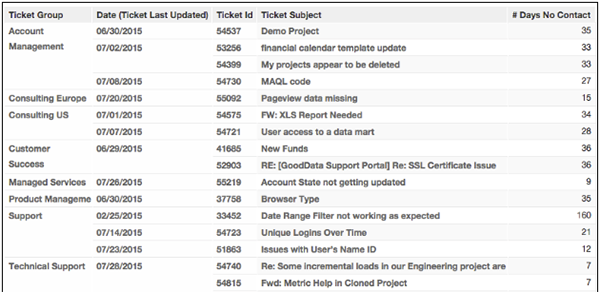
A helpful attribute for this report is Date (Ticket Last Updated) , which shows the last date a ticket received any update. Please note this attribute does not distinguish whether the update was made by the assignee or requester. In addition, you can add a numeric range filter to see the ticket IDs that have not been updated for over a week.
Here is the sample report created:
- # Days no Contact
- Ticket ID
- Ticket Assignee
- Date (Last Updated)
- Ticket Subject
- Ticket ID where # Day No Contact is greater than or equal to 7 (Numeric Range Filter)
- Status IS New, Open, Pending (List of Values)
We hope you find this report useful!
Comments
0 comments
Please sign in to leave a comment.